TL;DR
- Worker 5개 병렬 처리로 웹 스크래핑 시간을 5분→2분(60% 단축), 처리량 2.5배 향상 달성
- 이론상 5배 개선 대비 실제 2.5배는 50% 효율이나, 웹 스크래핑 분야에서 준수한 수준임
- 병목 원인은 네트워크 I/O, 서버 rate limiting, 시스템 오버헤드 등으로 예상됨
- 실용적 가치로 일일 처리량 2.5배 증가, 개발 시간 60% 절약, 서비스 응답성 60% 향상 효과 예상
requsets의 병렬화 필요성
trafilatura와 requests를 활용하여 500개의 기사를 순차적으로 처리할 경우, 기사 하나당 평균 처리 시간은 0.6초로 전체 처리시간은 약 5분이 소요되었다. 분당 100개의 웹사이트 처리하는 것이 느리지는 않으나, 시간을 더 단축해보기로 했다. request도 I/O 바운드 작업이기에 requests + threadpoolexecutor 조합으로 병렬화를 시도했다. (병렬화에 대한 내용은 이전 글을 참고)
Googlenewsdecoder - 병렬처리로 시간 단축하기
TL;DR GoogleNewsDecoder는 I/O 바운드 작업으로 병렬 처리에 적합한 특성을 가짐 Python의 concurrent.futures 라이브러리를 활용해 ThreadPoolExecutor 기반의 병렬 처리 시스템 구현 submit()과 as_completed() 메서드를
catalystmind.tistory.com
requsets와 ThreadPoolExecutor의 통합
requsets는 URL 요청으로 이루어진 I/O 바운드 작업이므로 멀티스레드를 이용한 병렬화 효과가 뛰어나다. 병렬처리를 위한 파이썬 코드는 이전 코드를 조합하여 작성하였다.(전체 파이썬 스크립트 및 사용법은 아래를 참고)
import pandas as pd
import trafilatura
from trafilatura.metadata import extract_metadata
import requests
import time
from datetime import datetime, timedelta
import csv
import argparse
import concurrent.futures
from typing import List, Optional
import os


def guess_best_decode(data: bytes, encodings: List[str]) -> str:
    """Pick the decoding that yields the most Hangul characters."""
    best_text: Optional[str] = None
    best_score = -1
    for enc in encodings:
        if not enc:
            continue
        try:
            text = data.decode(enc, errors="replace")
        except LookupError:
            continue
        # Score by Hangul character count
        score = sum(0xAC00 <= ord(ch) <= 0xD7A3 for ch in text)
        if score > best_score:
            best_text, best_score = text, score
        # Early exit if score is very high (heuristic)
        if score > 10:
            break
    if best_text is None:
        best_text = data.decode("utf-8", errors="replace")
    return best_text

def fetch_html_with_requests(url: str, timeout: int = 10) -> dict:
    """
    requests로 HTML만 다운로드하는 함수 (본문 추출은 별도로 수행)
    guess_best_decode를 활용한 강력한 인코딩 자동 보정
    """
    result = {
        'url': url,
        'html': '',
        'success': False,
        'error': None,
        'method_used': 'requests_only'
    }

    try:
        headers = {
            'User-Agent': 'Mozilla/5.0 (Windows NT 10.0; Win64; x64) AppleWebKit/537.36 (KHTML, like Gecko) Chrome/119.0.0.0 Safari/537.36'
        }
        response = requests.get(url, headers=headers, timeout=timeout)
        response.raise_for_status()

        # ✅ guess_best_decode를 통해 인코딩 복원
        candidates = [
            response.encoding,
            response.apparent_encoding,
            'utf-8',
            'euc-kr',
            'cp949'
        ]
        result['html'] = guess_best_decode(response.content, candidates)
        result['success'] = True

    except Exception as e:
        result['error'] = str(e)

    return result

def process_single_url(url, index=None):
    """단일 URL 처리 함수 - 병렬처리에 최적화"""
    start_time = time.time()
    result = {
        "index": index,
        "url": url,
        "status": "failed",
        "title": None,
        "date": None,
        "content": None,
        "processing_time": 0,
        "error_message": None,
    }

    try:
        # HTML 다운로드
        html_result = fetch_html_with_requests(url)

        if html_result['success']:
            html_content = html_result['html']

            # trafilatura로 메타데이터 추출
            metadata = trafilatura.extract_metadata(html_content)

            # trafilatura로 본문 추출
            text = trafilatura.extract(
                html_content,
                output_format="txt",
                include_comments=False,
                favor_precision=True,
            )

            if text and len(text.strip()) > 0:
                result.update({
                    "status": "success",
                    "title": metadata.title if metadata and metadata.title else "No title",
                    "date": str(metadata.date) if metadata and metadata.date else "No date",
                    "content": text[:200] + "..." if len(text) > 200 else text,
                })
            else:
                result["error_message"] = "Empty content extracted"
        else:
            result["error_message"] = f"Failed to download page: {html_result['error']}"

    except Exception as e:
        result["error_message"] = str(e)

    # 처리 시간 계산
    processing_time = time.time() - start_time
    result["processing_time"] = processing_time

    return result


def save_results_to_csv(results, output_file=None):
    """결과를 CSV 파일로 저장"""
    # 파일명이 지정되지 않으면 현재 시간을 포함한 파일명 생성
    if output_file is None:
        timestamp = datetime.now().strftime("%Y%m%d_%H%M%S")
        output_file = f"url_processing_results_{timestamp}.csv"

    try:
        with open(output_file, "w", newline="", encoding="utf-8") as csvfile:
            fieldnames = [
                "index",
                "url",
                "status",
                "title",
                "date",
                "content",
                "processing_time",
                "error_message",
            ]
            writer = csv.DictWriter(csvfile, fieldnames=fieldnames)

            writer.writeheader()
            for result in results:
                writer.writerow(result)

        print(f"✅ 결과가 '{output_file}' 파일에 저장되었습니다.")
        return output_file  # 실제 저장된 파일명 반환

    except Exception as e:
        print(f"❌ 결과 저장 실패: {e}")
        return None


def print_summary(results, total_time, skipped_count=0, workers_used=1):
    """처리 결과 요약 출력"""
    total_urls = len(results)
    successful_count = sum(1 for r in results if r["status"] == "success")
    failed_count = total_urls - successful_count
    processing_times = [r["processing_time"] for r in results]

    # 시간 포맷팅 함수
    def format_time(seconds):
        if seconds < 60:
            return f"{seconds:.2f} seconds"
        else:
            return str(timedelta(seconds=round(seconds)))

    print("\n" + "=" * 7 + " SUMMARY " + "=" * 7)
    print(f"Total URLs processed: {total_urls}")
    print(f"Workers used: {workers_used} (Parallel processing: {'Enabled' if workers_used > 1 else 'Disabled'})")
    print(f"Successfully decoded: {successful_count} ({successful_count/total_urls*100:.1f}%)")
    print(f"Failed to decode: {failed_count} ({failed_count/total_urls*100:.1f}%)")
    print(f"Skipped (Google News URLs): {skipped_count} ({skipped_count/(total_urls + skipped_count)*100:.1f}%)")

    if processing_times:
        avg_time = sum(processing_times) / len(processing_times)

        print("\n" + "-" * 5 + " TIMING INFORMATION " + "-" * 5)
        print(f"Total processing time: {format_time(total_time)}")
        print(f"Average processing time per URL: {format_time(avg_time)}")
        print(f"Fastest URL processing time: {format_time(min(processing_times))}")
        print(f"Slowest URL processing time: {format_time(max(processing_times))}")

    print("\nProcess completed successfully. Results saved to CSV file.")


def process_urls_from_csv(csv_file_path, url_column="decoded_url", output_dir=None,
                         batch_size=10, workers=1):
    """CSV 파일에서 URL들을 읽어서 병렬 처리"""

    print("=" * 50)
    print("🚀 URL 배치 처리 시작")
    print("=" * 50)

    # CSV 파일 읽기
    try:
        df = pd.read_csv(csv_file_path)
        print(f"📋 CSV 파일 컬럼들: {list(df.columns)}")
        print(f"📋 총 행 수: {len(df)}")

        if url_column not in df.columns:
            raise ValueError(f"Column '{url_column}' not found in CSV file")

        print(f"📋 '{url_column}' 컬럼의 NULL이 아닌 값 개수: {df[url_column].notna().sum()}")

        all_urls = df[url_column].dropna().tolist()
        print(f"📋 첫 번째 URL 샘플: {all_urls[0] if all_urls else 'None'}")

        # news.google.com이 포함되지 않은 URL만 필터링
        urls = [url for url in all_urls if "news.google.com" not in str(url)]

        total_urls = len(urls)
        skipped_urls = len(all_urls) - total_urls

        print(f"📊 전체 URL: {len(all_urls)}개")
        print(f"📊 처리 대상 URL (decoded URLs): {total_urls}개")
        print(f"📊 건너뛴 URL (Google News URLs): {skipped_urls}개")
        print(f"📊 배치 크기: {batch_size}")
        print(f"📊 작업자 수: {workers} (병렬 처리: {'활성화' if workers > 1 else '비활성화'})")

        if urls:
            print(f"📋 첫 번째 디코딩된 URL 샘플: {urls[0]}")

        print("-" * 30)

    except Exception as e:
        print(f"❌ CSV 파일 읽기 실패: {e}")
        return None, None

    # 출력 파일 설정
    if output_dir is None:
        output_dir = os.path.dirname(csv_file_path) or '.'

    timestamp = datetime.now().strftime("%Y%m%d_%H%M%S")
    input_filename = os.path.basename(csv_file_path).split('.')[0]
    output_filename = f"{input_filename}_processed_{timestamp}.csv"
    output_path = os.path.join(output_dir, output_filename)

    print(f"📁 결과 저장 경로: {output_path}")

    total_start_time = time.time()
    results = []
    completed = 0

    # 병렬 처리 사용 여부에 따라 처리 방식 결정
    if workers > 1:
        print(f"🔄 병렬 처리 모드로 실행 중...")

        # URL 배치로 나누기 (한 번에 batch_size만큼 병렬 처리)
        for batch_start in range(0, total_urls, batch_size):
            batch_end = min(batch_start + batch_size, total_urls)
            batch_urls = urls[batch_start:batch_end]

            print(f"처리 중: URLs {batch_start+1}-{batch_end} of {total_urls}...")

            # 병렬 처리 실행
            with concurrent.futures.ThreadPoolExecutor(max_workers=workers) as executor:
                # URL을 병렬로 처리 (인덱스도 함께 전달)
                future_to_data = {
                    executor.submit(process_single_url, url, batch_start + i): (url, batch_start + i)
                    for i, url in enumerate(batch_urls)
                }

                # 결과 수집
                for future in concurrent.futures.as_completed(future_to_data):
                    result = future.result()
                    results.append(result)
                    completed += 1

                    # 진행 상황 표시 (10개마다 또는 배치 완료 시)
                    if completed % 10 == 0 or completed == total_urls:
                        successful_in_batch = sum(1 for r in results[-len(batch_urls):] if r["status"] == "success")
                        print(f"진행: {completed}/{total_urls} ({completed/total_urls*100:.1f}%) "
                              f"배치 성공: {successful_in_batch}/{len(batch_urls)}")

            # 현재까지의 결과를 CSV 파일로 저장
            save_results_to_csv(results, output_path)
            print(f"💾 {len(results)}개 결과 저장 완료")

    else:
        print(f"🔄 순차 처리 모드로 실행 중...")

        # 직렬 처리 사용 (기존 방식)
        for i, url in enumerate(urls):
            if i % 10 == 0 or i == total_urls - 1:
                print(f"처리 중: URL {i+1}/{total_urls}...")

            # 단일 URL 처리
            result = process_single_url(url, i)
            results.append(result)
            completed += 1

            # batch_size마다 중간 결과 저장
            if (i + 1) % batch_size == 0 or i == total_urls - 1:
                save_results_to_csv(results, output_path)
                successful_count = sum(1 for r in results if r["status"] == "success")
                print(f"진행: {completed}/{total_urls} ({completed/total_urls*100:.1f}%) "
                      f"성공: {successful_count}, 실패: {completed-successful_count}")

    total_processing_time = time.time() - total_start_time
    print_summary(results, total_processing_time, skipped_urls, workers)

    return results, output_path


def main():
    # 명령줄 인자 파서 설정
    parser = argparse.ArgumentParser(description='URL content extractor with parallel processing')
    parser.add_argument('csv_file_path', nargs='?',
                       help='Path to CSV file containing URLs to process')
    parser.add_argument('--url_column', '-c', default='decoded_url',
                       help='Name of the column containing URLs (default: decoded_url)')
    parser.add_argument('--output_dir', '-o',
                       help='Output directory for results (default: same as input file)')
    parser.add_argument('--batch_size', '-b', type=int, default=10,
                       help='Batch size for saving interim results (default: 10)')
    parser.add_argument('--workers', '-w', type=int, default=1,
                       help='Number of worker threads for parallel processing (default: 1)')

    args = parser.parse_args()

    # 기본 파일 경로 (명령줄에서 제공되지 않은 경우)
    if args.csv_file_path is None:
        csv_file_path = r"C:\Users\yhsur\Downloads\특징주\sample_data\Combined_sample_data_500_decoded_2025-05-20_224740.csv"
        print(f"⚠️  기본 파일 경로 사용: {csv_file_path}")
    else:
        csv_file_path = args.csv_file_path

    # 설정 정보 출력
    print(f"📁 입력 파일: {csv_file_path}")
    print(f"📋 URL 컬럼명: {args.url_column}")
    print(f"📁 출력 디렉토리: {args.output_dir or '입력 파일과 동일'}")
    print(f"📦 배치 크기: {args.batch_size}")
    print(f"👥 작업자 수: {args.workers}")

    # 함수 실행
    results, saved_file = process_urls_from_csv(
        csv_file_path,
        url_column=args.url_column,
        output_dir=args.output_dir,
        batch_size=args.batch_size,
        workers=args.workers
    )

    if results:
        print(f"\n📁 저장된 파일: {saved_file}")

        print("\n🔍 처리 결과 샘플:")
        for i, result in enumerate(results[:3]):
            print(f"\n[{i+1}] {result['url'][:50]}...")
            print(f"    상태: {result['status']}")
            print(f"    제목: {result['title']}")
            print(f"    처리시간: {result['processing_time']:.2f}초")
            if result["status"] == "failed":
                print(f"    오류: {result['error_message']}")

        print(f"\n✅ 처리 완료! 총 {len(results)}개 URL 처리됨")
    else:
        print(f"\n❌ 처리 실패. 위의 오류 메시지를 확인하세요.")


if __name__ == "__main__":
    main()
python script.py input.csv --workers 5 --batch_size 20 --url_column "link" --output_dir "./results"--workers 5: 병렬 처리 스레드 수 (기본값: 1, 추천: CPU 코어 수의 1-2배)
--batch_size 20: 중간 저장 단위 (기본값: 10, 대용량 처리 시 50-100 권장)
--url_column "link": URL이 들어있는 컬럼명 (기본값: "decoded_url")
--output_dir "./results": 결과 파일 저장 디렉토리 (기본값: 입력 파일과 동일한 폴더)
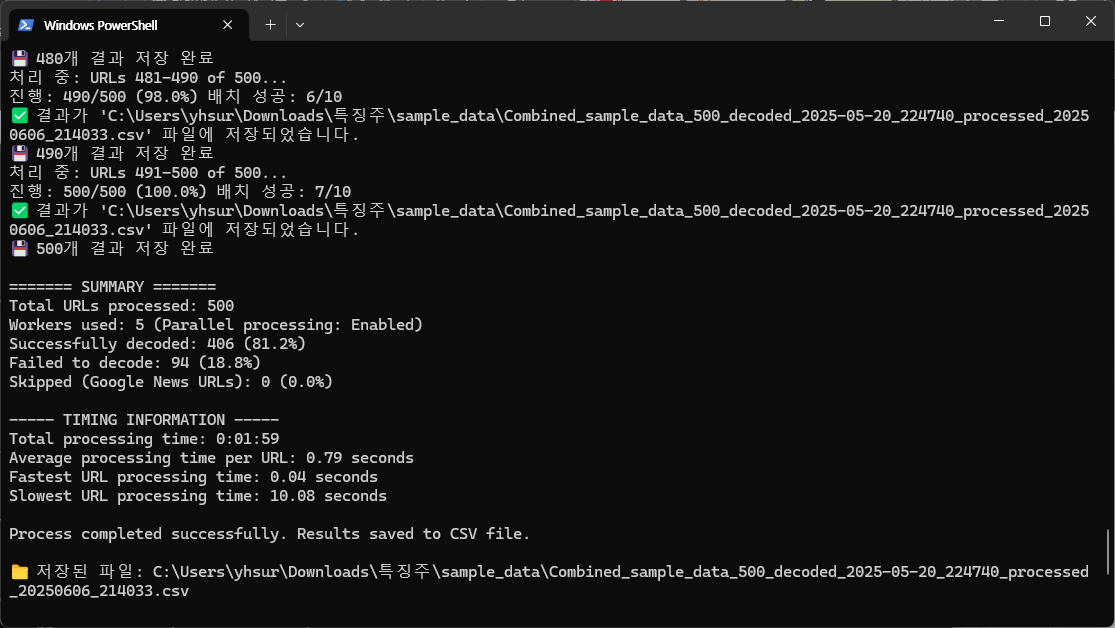
🖨️ 실행결과
📊 성능 평가 및 결과 해석
병렬 처리를 적용한 결과, 개당 평균 처리 속도는 0.61 → 0.79초로 증가하였으나, 병렬 처리 효과로 인해 전체 처리 시간은 60% 감소하였다.
| 성능 지표 | 순차 처리 (Sequential) |
병렬 처리 (Parallel) |
비교 결과 |
|---|---|---|---|
| 총 처리 시간 (500개 기사 수집) |
5분 05초 | 1분 59초 | ⏱ 60% 감소 |
| 평균 개별 처리 시간 |
0.61초 | 0.79초 | 🐢 30% 감소 |
| 전체 처리 효율성 |
낮음 (순차 대기) |
높음 (동시 처리) |
2.5배 향상 |
| 성공률 | 81.4% | 81.2% | 동등 수준 |
| 사용된 작업자 수 |
1개 | 5개 | 병렬 처리 활용 |
스레드 수를 5개로 늘렸지만 처리 시간이 정확히 1/5로 줄지는 않았는데, 그 이유는 다음과 같은 요인들 때문일 것으로 추정:
- 네트워크 지연: 전체 작업 시간 중 대부분이 요청/응답 대기일 수 있음
- 서버 반응 속도 제한: 일부 서버는 동시 요청을 제한하거나 봇으로 인식해 지연 응답할 가능성
- 스레드 오버헤드: 스레드 관리 및 메모리 할당 등의 부하가 효율을 일부 상쇄했을 수 있음
※ 실제 병목 원인은 작업 대상의 구조와 환경에 따라 달라질 수 있으며, 위 내용은 일반적인 웹 크롤링 병렬 처리에서 자주 관찰되는 패턴임
마무리
웹 크롤링 작업에서 request와 threadpoolexecutor를 활용해 실행 시간을 5분에서 2분으로 단축하는 데 성공했다. 간단한 병렬화 코드만 추가하여 60% 이상의 시간 절약, 그리고 2.5배 처리 속도 향상이라는 결과를 얻었을 수 있었다. 다음 글에는 requests에서 html 수집에 실패한 동적 웹사이트에서 정보를 가져오는 방법을 다룰 예정이다. 주로 자바스크립트를 이용한 동적 웹사이트에서 html을 수집하기 위해서 playwright와 같은 브라우저 자동화를 적용할 예정이다.